
在 Mudlet 上游玩身临其境的多人纯文本 RPG 游戏。
随处游玩。
Mudlet 可运行于 Windows、macOS 和 Linux 平台。在一台计算机上所撰写的脚本可在其他计算机上无缝运行,您可通过 Dropbox 分享您的档案。
快速。
从 Mudlet 出生起就已定义其卓越性能。自定义文本显示及 Lua 脚本系统将易如反掌地处理最大的难题。
100% 可模组化。
Mudlet 的整个用户页面被设计为均可修改 – 从窗口内的大小至客户端本身的外观。为您自己制作一个前往文本世界的美丽传送门。
免费且开源。
Mudlet 完全免费,您可自由下载、修改并拓展功能。在坚强的基底之上构建,加入我们使制作 MUD 的流程变得无与伦比。
什么是 MUD?
MUD (/ˈmʌd/;起初意为多用户地牢 (Multi-User Dungeon),随后产生称为多用户维度 (Multi-User Dimension) 及多用户领域 (Multi-User Domain) 的变体)[1][2] 是一个多人实时在线的虚拟世界,通常基于文字。MUD 结合了角色扮演游戏、砍杀游戏、 玩家对战游戏、交互式小说及在线聊天等元素。玩家可阅读或预览房间、物体、其他玩家、非玩家角色及在虚拟世界中所作行为的描述。玩家通常通过输入与自然语言相似的命令和玩家与世界交互。- 维基百科
这是一种你会爱上的游戏,它能叙述故事,或是进行史诗般的突袭,又或是进行尔虞我诈的政治斗争,亦或与您的朋友度过美好时光。
Mudlet 新闻
Mudlet 5.0
Mudlet 5.0 is the biggest release we have ever made: 420 commits and 537 closed issues since 4.22.0. It changes what happens the first time someone opens Mudlet, makes the client noticeably faster on the text it draws every second, and clears out a long list of everyday annoyances that had been with us for years.
Sixty seconds inside Mudlet 5.0: the redesigned game browser, the guided tour, the Base UI you can rearrange, and switching between open games with Ctrl+1 to Ctrl+9. Direct link.
New players get an interface
Until now, a new Mudlet player connected to a game and got a black window full of scrolling text. Everything else – health bars, a map, a place for chat – was something they had to build themselves, or find a package for.
5.0 builds it for them. The starter interface reads what the game already sends over GMCP and MSDP and assembles health, mana and endurance bars, a map pane and a chat window out of it, automatically, on first connect. Every piece of it can be dragged wherever you like: the health bars, the map and the chat window all move independently, and adjustable containers can now be pulled out of their parent entirely.
It is not a black box. The chat capture is a normal trigger tree you can open, read and copy into your own system, and the whole thing ships as a package you can uninstall – cleanly, and it now actually disappears from the screen when you do.
It comes in three looks: the default, plus fantasy and sci-fi themes.
Alongside it:
A tutorial invitation on first launch, and a UI tour that walks through the interface.
Feature callouts that point out things worth knowing as you go.
A simpler trigger editor by default, so the first thing you see is not every advanced option at once.
The games list is split into My games and All games tabs.
The New profile button now shows you what it did.
Mudlet is substantially faster
We measured this properly, at the 5.0.0 release tag: sanitizer-free release builds, alternating A/B passes against 4.22.0, no overlap between the ranges.
What
Change
Display paint time
-47.1% (+89% paints per second)
Text throughput
+26.6%
ISO 8859-1 decoding
+48.5%
46 active triggers
+23.6%
Geyser layout move
-47.2% per operation
Geyser layout resize
-53.8% per operation
And end-to-end, running two real Achaea systems over 100,000 lines of real game log achieved between 12-25% improved trigger performance.
The work behind it: the display no longer lays out blank spaces it will not draw, lines that already fit are not rewrapped, the ISO 8859-1 decoder stopped allocating a string per character, colour tags in cecho/decho/hecho are processed faster, the buffer is no longer rescanned for hyperlinks that were never created, and a Geyser layout is laid out once per move instead of several times over.
Everyday text, fixed
Two of these had been open for years:
Copying no longer pads leading spaces in a multi-line selection.
Clicking the game window no longer hijacks Ctrl+C.
Copy as image works without selecting text first.
OSC 8 hyperlinks are handled properly, with a setting to turn them off.
Plain underline no longer keeps a wavy, dotted or dashed style from earlier text.
Full-window background images and gradients are supported.
Playing several characters at once
Ctrl+Tab cycles game tabs and Ctrl+1 to Ctrl+9 jump straight to one – including on macOS at last. Detached profile windows behave properly too: they no longer block the main window from coming to the front, and Alt+W and Alt+O work in them.
Mudlet also warns when two keyboard shortcuts clash instead of silently letting one win, and you can now tab through the shortcut settings in the order they are shown, with screen readers supported.
Sign in through your browser
Supported games can now hand sign-in to your browser – Google, Discord, or the game’s own account system – instead of asking you to type a password into the game window. Mudlet keeps the reconnect token in your operating system’s keychain, so later reconnects need neither a password nor a sign-in screen, and Forget saved sign-in on the Connection tab clears it.
The protocol behind it is documented at GMCP Extensions for game authors who want to support it.
New games and a new language
Four games join the default list: Rites of Passage, Dark Mists, PhoenixMUD and Federation 2 Community Edition.
And Czech (Čeština) joins the ~20 languages Mudlet ships in – complete, at 3415 of 3415 strings, contributed by Pavel Třešňák.
For scripters
getWindowGeometry(), windowVisible() and getLabelText()
Widget state getters for titles, stylesheets, tooltips and scroll bars
remainingNamedTimer() to check the time left on a named timer
getTextFormat() now reports which underline style the game asked for
Map menus can be matched against their map events
MMCP – peer-to-peer chat between clients – is documented at last, in Networking Functions
–offline loads a profile without connecting
Every default package now ships as an mpackage
Experimental: undoing the game’s own wrapping
Mudlet can undo the line wrapping a game applies before sending text, so the text reflows to your window instead of breaking where the game decided. As far as we know no other MUD client does this.
It is off by default and marked experimental, because games wrap in ways that are not always possible to reverse cleanly. If you turn it on, we would like to hear how it goes.
Thanks to everyone who reported issues, sent patches, translated strings and tested the PTBs.
Mudlet 4.22.0
Added:
– a Configure Areas UI #9342
Improved:
– allow locking stub exits ("No route") via the Set Exits GUI #9352
– map room name label colour handling #9299
Fixed:
– plain Copy after Copy HTML no longer leaves HTML on the clipboard #9302
– disable "never" for one toolbar when other is "never" #7079 #9365
– keep locks on stub exits when auditing the map #9379
– enable/disable only affecting some same-named items on Windows #9366
– guard against null stopwatch when saving profiles and listing stopwatches #9376
– show room names menu item again #9374
– copying of default profiles after fresh install #9317
– map labels can no longer be edited in view-only mode #9306
– prevent focus being forced away from Editor when Toolbar activated #9358
Infrastructure:
– sign the Windows installer on release builds too
– merge release-4.21 back into development #9384
– don’t run DangerJS on release PRs #9375
– bump next milestone to 4.22.0 #9312
– Bump actions/checkout from 6 to 7 #9348
– Bump lukka/get-cmake from 4.3.2 to 4.3.4 #9347
– Update autocompletion data in Mudlet #9361
– Bump 3rdparty/sentry-native from ae55c1b to fea16b8 #9362
– Bump actions/cache from 5 to 6 #9363
– upload Windows Qt debug symbols to Sentry directly #9367
– rename ActionUnit::UpdateToolbar() to ActionUnit::UpdateAllToolbars() #9359
– update plural american english translations #8838
Other:
– release: Mudlet 4.22.0
Mudlet-4.20.1
Full Changelog: https://github.com/Mudlet/Mudlet/compare/Mudlet-4.20.0…Mudlet-4.20.1
测绘仪
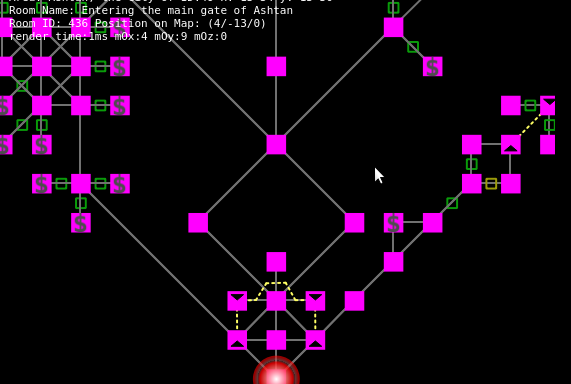
内置寻路功能的强大 2D 及 3D 测绘器。
Mudlet_563
City map with shops ($), doors, and and up/down exits.
立即加入!
即刻安装 Mudlet 并成为庞大世界中的一员!